ADJUSTMENT PROGRAM EPSON L5290 L5296

ADJUSTMENT PROGRAM EPSON L5290 L5296

(0 customer review)
ADJ PROG EPSON L5290 L5296

price/$6.00off/NEW

Epson Service Required

The Epson L5290 L5296 Software for Resetter Adjustment is a program that can be used to reset your printer’s waste ink pad counter. Now your printer displays the “Service Required” message, you can use this software to reset the factory condition printer.

How to Reset Epson L5290 L5296 Printer?

  1. Extract the Epson Resetter Software using WinRar
  2. Run adjustment program utility file, select the Epson printer type.
  3. After selecting the Epson printer model, click OK
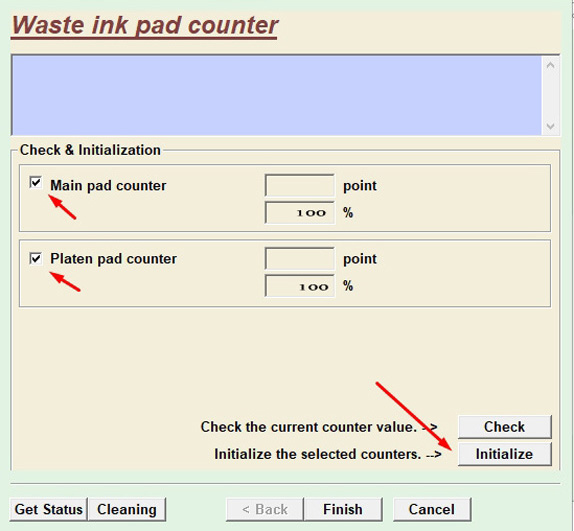
  4. In the Maintenance section, select Waste ink pad counter and press OK
  5. Make sure you have checked the Main Pad Counter box
  6. Click on the Check button.
  7. Select the Initialization button to reset the waste ink pad counter.
  8. Turn off your printer. Then Press Ok.
  9. Now Turn ON your Printer.
Epson L5290 Adjustment Program - Chipless Printers

Download link is automatically displayed after your donation